dart fix
Command-line tool for applying analysis fixes and migrating API usages.
The dart fix command
finds and fixes two types of issues:
-
Analysis issues identified by
dart analyzethat have associated automated fixes (sometimes called quick fixes or code actions). -
Outdated API usages when updating to newer releases of the Dart and Flutter SDKs or dependencies that provide data-driven fixes.
If you are a package maintainer, to help your users migrate when you change your package's API, you can author data-driven fixes.
Apply fixes
#To preview proposed changes, use the --dry-run flag:
dart fix --dry-run
To apply the proposed changes, use the --apply flag:
dart fix --apply
Options for dart fix
#
The following options can be used with the dart fix command.
-h, --help
#
Print usage information for dart fix.
dart fix --help
-n, --dry-run
#
Preview the proposed changes without modifying any files.
dart fix --dry-run
--apply
#
Apply the proposed changes directly to the source files.
dart fix --apply
--code
#
Apply fixes only for one or more specific diagnostic codes. Specify multiple diagnostic codes as a comma-separated list.
dart fix --apply --code=prefer_single_quotes,use_super_parameters
--compare-to-golden
#
Compare the result of applying fixes with golden files that contain the expected resulting code, without modifying the source files.
dart fix --compare-to-golden
Package maintainers can use this option to verify their data-driven fixes. To learn how to configure and run these tests, see Test your fixes.
Customize analysis-driven fixes
#
The dart fix command only applies fixes
when there is a "problem" identified by a diagnostic.
Some diagnostics, such as compilation errors, are implicitly enabled,
while others, such as lints, must be explicitly enabled
in the analysis options file,
as individual preferences for these vary.
You can sometimes increase the number of fixes that can be applied by enabling additional lints. Note that not all diagnostics have associated fixes.
Example
#Imagine you have code like this:
class Vector2d {
final double x, y;
Vector2d(this.x, this.y);
}
class Vector3d extends Vector2d {
final double z;
Vector3d(final double x, final double y, this.z) : super(x, y);
}
Dart 2.17 introduced a new language feature called super initializers,
which allows you to write the constructor of Vector3d
with a more compact style:
class Vector3d extends Vector2d {
  final double z;
  Vector3d(super.x, super.y, this.z);
}
To enable dart fix to upgrade existing code to use this feature,
and to ensure that the analyzer warns you when you later forget to use it,
configure your analysis_options.yaml file as follows:
linter:
  rules:
    - use_super_parameters
Make sure your code enables the required language version.
Super initializers were introduced in Dart 2.17,
so update pubspec.yaml to have at least that
in the lower SDK constraint:
environment:
  sdk: ">=2.17.0 <4.0.0"
You should then see the following when viewing the proposed changes:
dart fix --dry-run
Computing fixes in myapp (dry run)... 9.0s
1 proposed fixes in 1 files.
lib/myapp.dart
use_super_parameters • 1 fix
To learn more about customizing analysis results and behavior, see Customizing static analysis.
IDE support
#
When you open a project in an editor with Dart support,
the Dart analyzer scans the project for issues that dart fix can repair.
If it finds issues for repair,
the editor can display prompts and offer quick fixes (code actions).
VS Code
#In VS Code, the Dart extension displays a prompt when fixes are available:
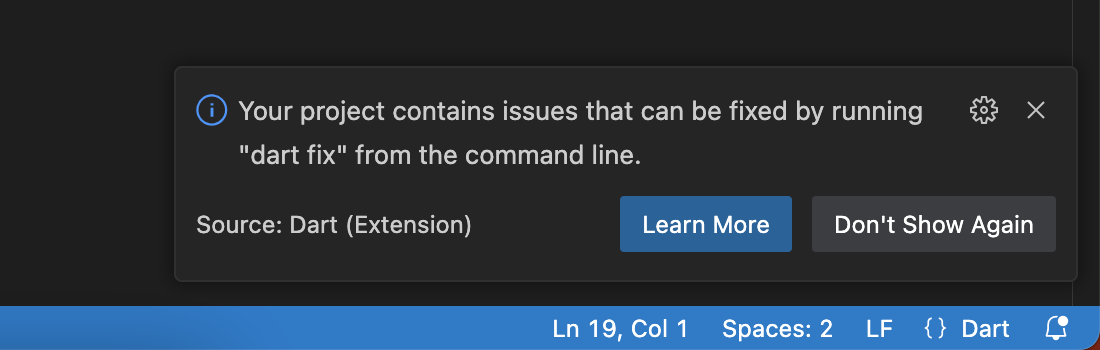
After running dart pub get or dart pub upgrade,
VS Code might also display this prompt if package changes
add issues that dart fix can repair.
Save all of your files before running dart fix.
This ensures that Dart uses the latest versions of your files.
IntelliJ IDEA and Android Studio
#In JetBrains IDEs, press Alt + Enter on Windows or Linux or Option + Return on macOS on any highlighted code diagnostic to view and apply available quick fixes.
Unless stated otherwise, the documentation on this site reflects Dart 3.13.3. Page last updated on 2026-10-01. View source or report an issue.