How Dart’s null safety helped me augment my projects
I migrated a running app and a published package to null safety, and it was awesome!

About the author: Waleed Arshad is a core mobile technologist, a passionate cross-platform developer, and the first person from Pakistan to become a Google Developer Expert for Flutter. After graduating from FAST Karachi, he has been working in the industry for more than five years and is currently working in the Developer Experience team for Flutter at Tendermint. He also leads Pakistan’s Flutter community.
With the launch of Flutter 2, null safety was made available to Flutter’s stable channel. This post talks about my personal experiences with migrating my apps and packages to null safety, along with creating null-safe apps from scratch. In short, the results were amazing!
If you aren’t aware of Flutter’s null safety feature, check out the announcement of null safety. If you want to fully understand null safety, check out the Dart documentation for null safety.
This article describes two of my experiences with null safety:
Migrating an app and a package
Writing new code in a null-safe environment
Migrating an app and a package
#
When I first upgraded Flutter to version 2.0 (the one that supports null safety) and updated my Dart SDK version to 2.12 in my Flutter app’s
pubspec.yaml file, I saw a lot of errors. I wanted to initially try a manual migration to null safety (that is, migrate without the migration tool), so I started to resolve the null safety errors manually — adding question marks and exclamation points all over my code. I did all of that work intentionally, just to understand all the hard work done by the Flutter team on the
null safety migration tool to automate the process of changing and updating the code! After some experimentation, I reverted all the manual changes I’d made by hand, and I used the magic of the tool to complete the migration of my app.
The application was an experimental COVID-19 stats app, and its code is fully open sourced. You can find it on GitHub.
It was really cool to see all the code changes the migration tool did in my project — code changes like adding question marks in nullables and adding exclamation points where the migration tool detected that the value was never going to be null.
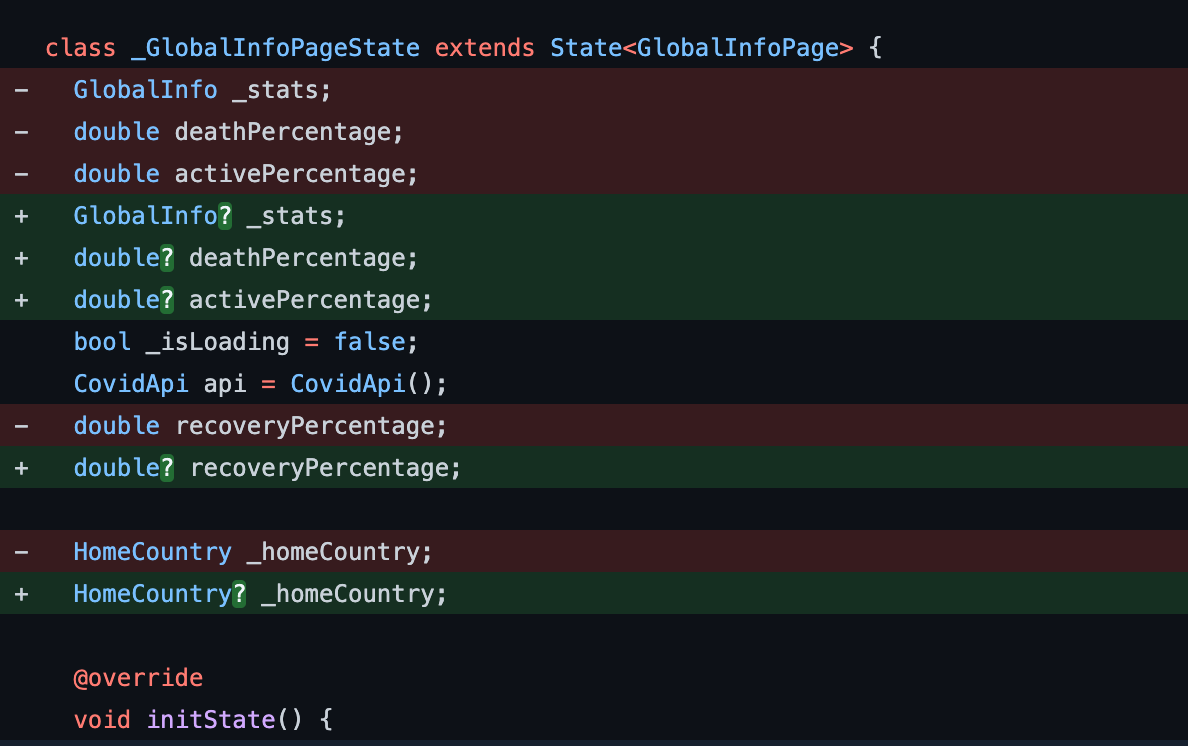
The following is an example of the migration tool automatically adding question marks and exclamation points .
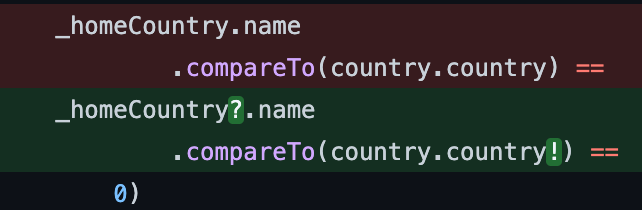
_homeCountry is a nullable property of a class named HomeCountry (which is also nullable). Therefore, to guard access to one of the properties of
_homeCountry, the tool added the question mark operator.
After the migration, some issues in the code became evident, which is the best part.
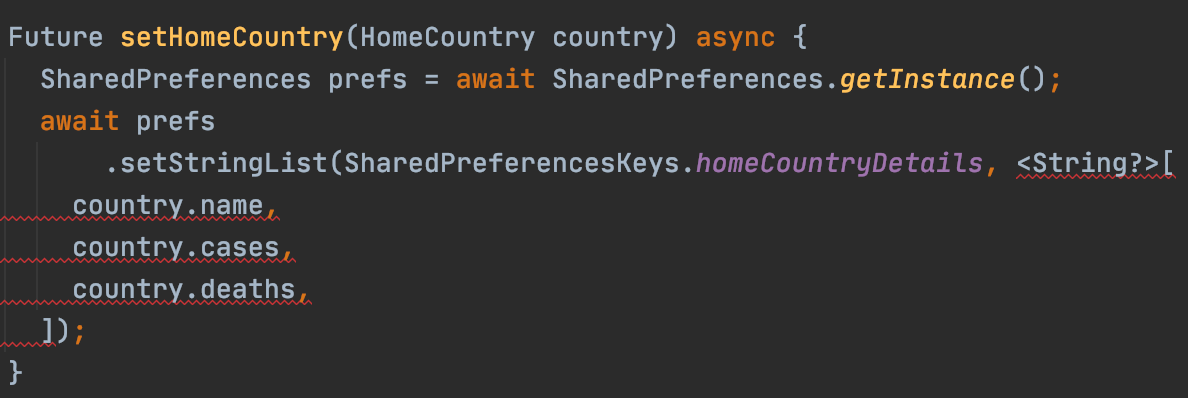
One of the issues was that some nullable strings were being passed as a list to an internal function of the
shared_preferences plugin. Because these values were nullable, the tool made the whole list type
<String?>[], which started giving an error because the function accepted the type
<String>[].
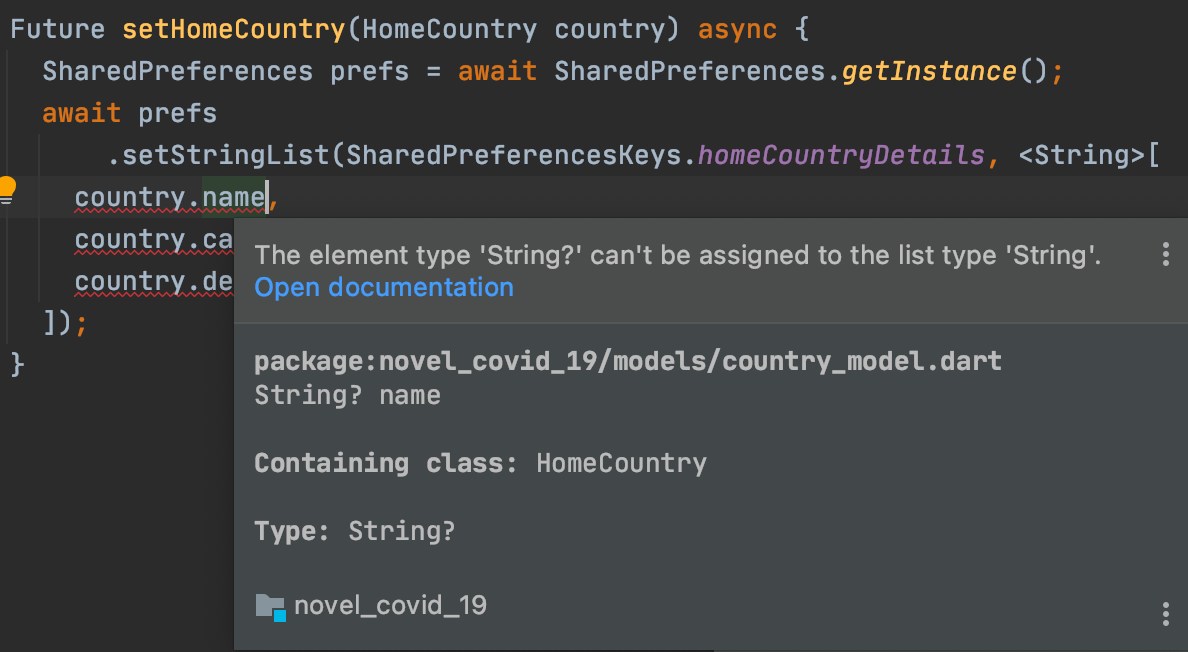
A simple solution to this problem was to remove the question mark and make the list type match the type of the function parameter. When I did that, the analyzer started saying that a nullable type (String?) can’t be assigned to a non-nullable type (String).
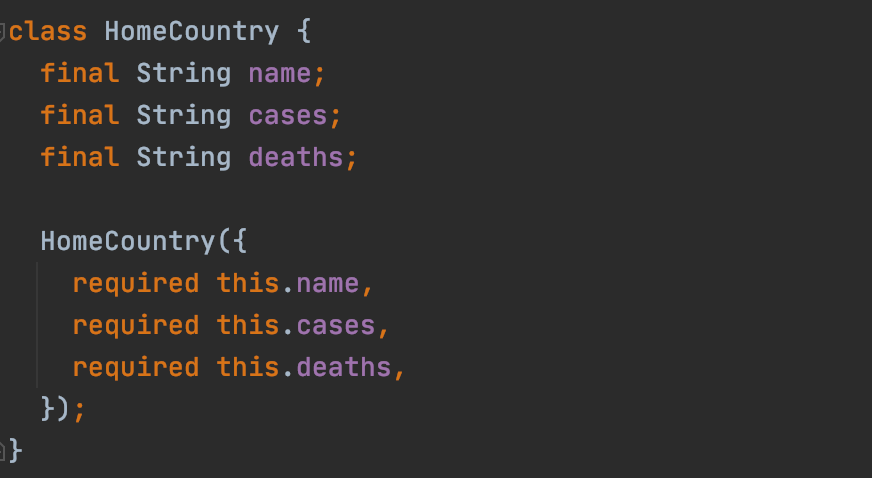
To resolve the problem, I made each property of HomeCountry class non-nullable and added a
required keyword in the constructor. That meant it was now necessary to pass the arguments while initializing
HomeCountry. I didn’t have to change the setHomeCountry function because the variables being passed to the list were now non-nullable.
This change prevented me from mistakenly sending a null value to shared preferences in my code, which was very valuable input by the null safety feature!
Another thing null safety found was a bug that could cause a crash at runtime. See the following code snippet:
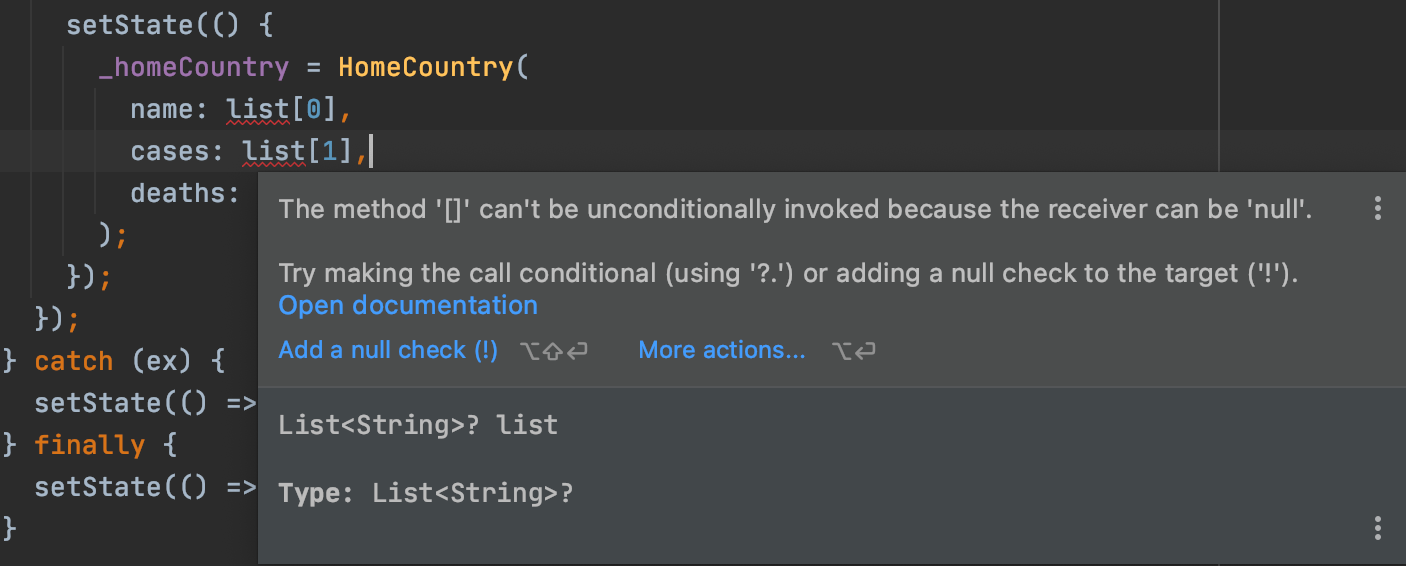
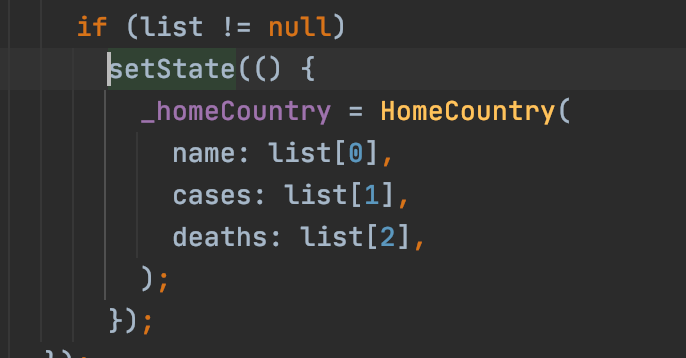
Because list was a nullable variable, reading its index-based elements could cause a crash. After migrating to null safety, I couldn’t compile the app because there was no null check before reading the values in this list.
Ultimately, I added a null check to make the code compile and to prevent the app from crashing at this place in the code. It’s amazing how migrating helped me find an actual bug!
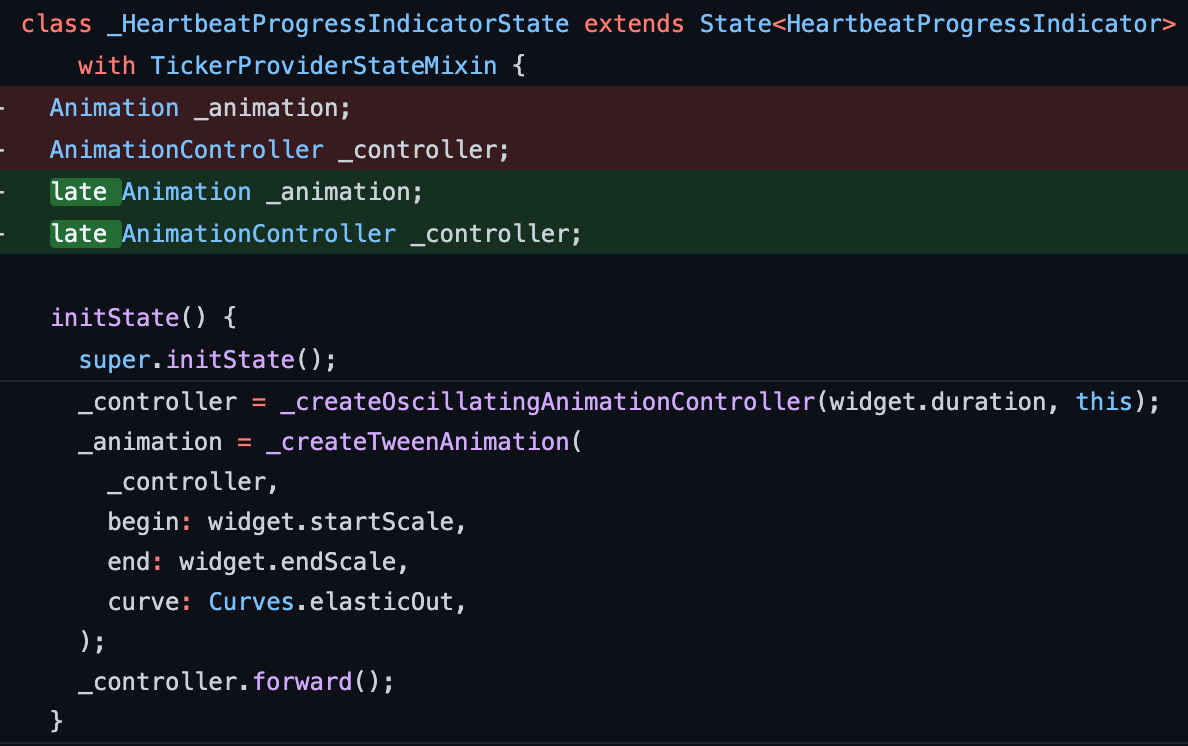
I also happened to migrate a very small package, which you can find on pub.dev, called
progress_indicators. I was astonished to see how the migration tool added
late keywords instead of question marks when it concluded that those variables were initialized before being used.
Writing new code in a null-safe environment
#Now that Flutter has null safety, creating new apps is a better developer experience. Writing new code in a null-safe environment also provides a better understanding of code flows, along with being able to write crash-safe code. You cannot create compilable code with a class like this now:
class MyClass {
  String a;

  MyClass({this.a});
}
This code causes a compile-time error that says to mark a as nullable, put a required
keyword in the constructor, or add an initializer. The code is making sure that a is never null. So, depending on your use case, you might do this:
class MyClass {
  String? a;

  MyClass({this.a});
}
Or you might do this:
class MyClass {
  String a;

  MyClass({required this.a});
}
Notice that you don’t put an at sign (
@) before therequiredkeyword, as of Flutter 2 (and Dart 2.12).
Or you might keep a as optional, but add an initializer giving it a default value if one isn’t passed:
class MyClass {
  String a;

  MyClass({this.a = ''});
}
Also, now you can create nullable variables of your own created classes:
class MyClass {
  String? a;

  MyClass({this.a});
}

// somewhere in main code

MyClass? myClass;
Because myClass has a nullable type, your compiler will give an error if you write something like this:
print(myClass.a);
Here is the error:
The property ‘a’ can’t be unconditionally accessed because the receiver can be ‘null’.
You can fix that error by adding a question mark:
print(hello?.a);
Dart’s null safety feature makes sure that you write less vulnerable and safer code. Picking up errors related to null variables during compile time is a valuable addition to the development experience. The preceding example shows how the compiler stops you from compiling the code whenever it detects the possibility of a null-pointer exception causing the app to crash at runtime. This clearly means that the compiler tries to write null-safe code as much as possible (unless you use the
! operator to force unwrap everything).
In conclusion, Dart’s sound null safety is a credible kick starter for building safer, faster, and more reliable apps! The overall coding experience is now highly formulated and more organized. I recommend that you migrate your old Dart apps to null safety to understand how it works. Maybe you’ll be lucky enough to find and fix some bugs in your old code!
Happy coding! :)
More from Dart

Google Summer of Code 2026 results
Today, we spotlight the projects and results from contributors mentored by Dart and Flutter in Google Summer of Code 2026.


Dart in Google Summer of Code 2026
We’re excited to announce that the Dart project will mentor contributors for the seventh time in Google Summer of Code 2026!