Better isolate management with Isolate.run()
Dart 2.19 introduces a new function that makes implementing concurrency as simple as a single line of code.

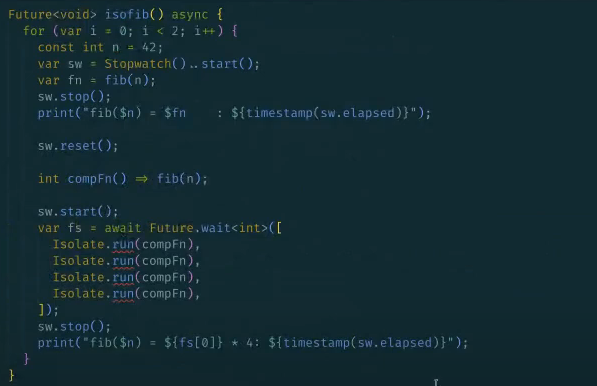
All Dart code runs in isolates. Whether you implement multiple isolates to enable concurrency
in your Dart programs is up to you. How you can implement multiple isolates is up to us on the Dart team, and in Dart 2.19, we’ve made a huge upgrade to the process that we’re excited to share. Meet
Isolate.run()!
run() takes all of the complexity of setting up and managing isolates and completely abstracts it into a single function call. It’s been possible to use isolates with a handful of primitives for a while now. But, even with all
the recent performance improvements
for isolates, the process was at best, tedious, and at worst, error-prone.
To appreciate how much of an improvement run() is, this article breaks down the previous method of building out the functionality piece-by-piece from low-level primitives. Then, we’ll contrast that to using
Isolate.run(), and show you how it works on the inside. Even if you’ve never used isolates before, we’re sure that
run() will get you excited to try them out!
Isolates
#
Isolates are a fairly straightforward concept. An isolate
is essentially a single thread of execution in Dart. They let you execute parts of your code in parallel. You can start new parallel executions (as many as you want) and tell them what to do, right from
main (the main thread, or main isolate). Isolates don’t share memory; instead, they pass messages back and forth to communicate. So, you don’t have to worry about typical multithreading problems, like race conditions, or mutexes and locks.
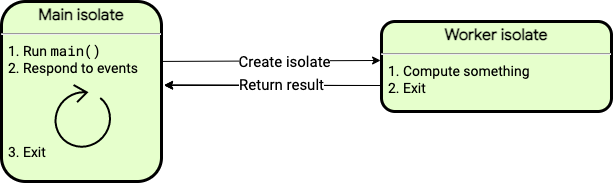
Sounds great! But how do you use them? Before Isolate.run(), that’s where things became tricky.
The isolate API is made up of low-level primitives that provide a wide range of functionality. Granularity like that is great when you need to customize your isolates’ functionality. Granularity is not so great, though, when it’s necessary to use isolates at all. Especially since almost all of the use cases for isolates require the same basic configurations for setup and management. This basically meant exposing every implementation detail for you, Dart’s users, to handle yourselves.
Let’s take a look at a typical isolate setup to better understand the tedious process that Isolate.run()
solves.
Using Isolates (before)
#
You can think of Isolate.spawn()
as the old starting point for isolates. Flutter’s compute function was built off of spawn(). It takes a method to invoke as its
entrypoint argument, plus any arguments for that method, and other configurations for the isolate itself. In the past, this
entrypoint could only be a top-level or static method.
Isolate.spawn(_readAndParseJson, filename);
Isolate created, all done! Just kidding. Not even close.
Calling spawn won’t return anything to actually work with. It only returns an isolate object, which simply confirms the isolate has started.
The main isolate and the spawned isolate (the isolate created by spawn()) can’t communicate directly, beyond the initial arguments passed on creation. Realistically, even if you don’t need any computation results back from the spawned isolate, you would still want some kind of verification that the computation succeeded, so you’re always going to want a message back.
To enable communication, you have to set up ports. You create a ReceivePort object before calling spawn. The
sendPort member of the ReceivePort object goes to the spawned isolate as another argument for
spawn.
void main() async {
 final resultPort = ReceivePort();
 final jsonData = await Isolate.spawn(_readAndParseJson, [resultPort.sendPort, filename]);
}
This means the function you pass to spawn has to be specifically configured to do something with that
sendPort. In other words, you can’t just reuse existing functions with isolates. So instead of passing
spawn a regular function that just reads and parses a JSON file, you would create something like:
Future<void> _readAndParseJson(List<dynamic> args) async {
SendPort responsePort = args[0];
String fileName = args[1];
final fileData = await File(filename).readAsString();
final result = jsonDecode(fileData);
// ...
}
Your special, isolate-friendly, JSON-decoding function can simply “return result” and you’re all done, right? Not quite. The result needs to be sent through
responsePort. That’s how isolates communicate with ports. You can use another primitive,
Isolate.exit() to return the result efficiently and close the spawned isolate at the same time:
Isolate.exit(responsePort, result);
The exit() function transfers the memory that holds the message in the spawned isolate to the main isolate (as opposed to copying it over) and safely closes the isolate.
Let’s string this all together. Since result in this example is parsed JSON , you’d probably want to destructure it a little to actually use it. For the sake of clean code, instead of planting those three lines that create the
receivePort and the isolate, and await their response, right into main(), we should put them in their own function.
void main() async {
final jsonData = await _spawnAndReceive(filename);
print('Received JSON with ${jsonData.length} keys');
}
// Spawns an isolate and waits for the first message
Future<Map<String, dynamic>> _spawnAndReceive(String filename) async {
final resultPort = ReceivePort();
await Isolate.spawn(_readAndParseJson, [resultPort.sendPort, filename]);
return (await resultPort.first) as Map<String, dynamic>;
}
// The entrypoint that runs on the spawned isolate.
void _readAndParseJson(List<dynamic> args) async {
SendPort responsePort = args[0];
String fileName = args[1];
final fileData = await File(filename).readAsString();
final result = jsonDecode(fileData) as Map<String, dynamic>;
Isolate.exit(responsePort, result);
}
What’s being accomplished is relatively straightforward. It’s the exposure of implementation details that makes it feel complicated, like ports for message passing, and needing a dedicated function for dealing with ports that’s otherwise isolate-agnostic.
Error handling
#The example so far still isn’t really a “complete”, production-ready implementation. You’d be doing yourself a disservice to leave out any kind of error handling, but it’s commonly forgotten as an additional step in an already substantial process. Without any error handling, if an uncaught async error were to crash your isolate, for example, you wouldn’t know what happened to cause the error, or even be alerted that anything had happened at all.
Covering every error handling possibility for isolates would be extensive, but in general it would involve a few more additions to the code.
You could, as a minimum, add the errorsAreFatal, onExit, and onError
parameters to the spawn call:
  await Isolate.spawn(_readAndParseJson, [resultPort.sendPort, filename],
          onError: resultPort.sendPort,
          onExit: resultPort.sendPort,
          errorsAreFatal: true
  );
This ensures that resultPort receives a message even if the spawned isolate terminates without sending a result, or if it has any uncaught errors. Making errors fatal means uncaught errors exit the isolate as a safety precaution, to ensure it terminates at all.
The onExit argument makes the isolate send null to the port upon exiting. The
onError argument makes an uncaught error send a list of two strings to the port (the toString
of both the error and stack trace).
Reusing the result port lets you avoid creating more ports, so you only have to look for messages in one place. But it also means you need to distinguish the
onExit and onError messages from the result value. Here, we assume that the JSON must be a
Map, so it cannot be a list or null. Otherwise you’d also have to wrap the result in something recognizable. You would have to create a (trivial) message protocol on top of the port messages.
Beyond that minimum, you could then check response for specific errors. One such case would be checking if
resultPort is null, meaning the isolate terminated without sending results:
  final response = await resultPort.first;
  if (response == null) {
    // Isolate exited. Throw some error, for example:
    throw RemoteError("Isolate terminated without result");
  }
Another would be checking if the result is a list, meaning an uncaught error occurred:
  if (response is List<dynamic>) {
    // Uncaught error, list of two strings.
    var remoteError = RemoteError(response[0], response[1]);
    await Future.error(remoteError); // Rethrow.
  }
Then, finally, handle an actual result:
// Otherwise it's a result value, which is a map.
return message as Map<String, dynamic>;
In any case, you’d want to put spawn in a try block to check if sending the
entrypoint to the new isolate failed. If it did, the result port won’t get any message, and needs to be closed:
  try {
    await Isolate.spawn( ... );
  } on Object {
    resultPort.close();
    rethrow;
  }
Providing a bare minimum of error handling ensures that the result port is always closed, and _spawnAndReceive
always completes, no matter how the spawned isolate exits. You could also make things nicer, for example, by catching and sending errors and stack traces back as actual objects, not just strings like the
onError handler.
Error handling obviously introduces a lot of variation, and with it the mental overhead of deciding how to approach it and what to factor for. It’s understandable that it’s commonly left out of primitive isolate setup.
Using Isolates (after)
#
Isolate.run() sets up all parts of isolate implementation with the primitives you previously had to use yourself, in a single function call:
void main() async {
  final jsonData = await Isolate.run(_readAndParseJson);
  print('Received JSON with ${jsonData.length} keys');
}
No ports, no separate spawning, exiting, or error handling, and no special return structure. Perhaps the best part, the
entrypoint you pass to run can be any existing function:
Future<Map<String, dynamic>> _readAndParseJson() async {
  final fileData = await File(filename).readAsString();
  return jsonDecode(fileData);
}
This example shows an asynchronous function, but run could just as easily execute a
synchronous function. The run function itself always returns asynchronously, which is all that matters.
The entrypoint can also be a function expression, written directly inline wherever you call
run. Isolates, and any higher-level APIs written on top, are no longer limited to running only static or top-level functions.
  final jsonData = await Isolate.run(() async {
    final fileData = await File(filename).readAsString();
    final jsonData = jsonDecode(fileData) as Map<String, dynamic>;
    return jsonData;
  });
The additional message parameter is no longer necessary, and you can avoid packing and unpacking arguments in data structures like lists.
You don’t have to think much about error handling at all. The run function combines local and remote error capturing, handling and cross-isolate communication, and exposes the result as a single normal (asynchronous) error that you can catch in a standard
try/catch. You can forget isolates, and treat it as a normal function.
  try {
    await Isolate.run(_readAndParseJson);
  } on FormatException catch (e, s) {
    print(e.message);
  }
Isolate.run() enables much cleaner and ergonomic code. Flutter’s compute function even switched over to using
run instead of spawn!
Inside Isolate.run()
#
Take a look at the [implementation of run](https://api.dart.dev/dev/3.0.0-125.0.dev/dart-isolate/Isolate/run.html#implementation:~:text=isolate%20for%20debugging.-,Implementation,-%40Since(%222.19) itself. It digs into all the low-level isolate-related APIs (which would’ve been your job to implement before) to construct a “perfect”, comprehensive isolate setup. It takes the method to execute,
computation, and sets up all the ports and their returns to account for efficient message passing between isolates.
static Future<R> run<R>(FutureOr<R> computation(), {String? debugName}) {
    var result = Completer<R>();
    var resultPort = RawReceivePort();
    // ...
    result.complete;    // or result.completeError for error handling blocks
    // ...
There’s thorough error handling for every potential case. The run function checks whether an isolate dies before it’s done computing. If the computation throws, the isolate terminates and throws the same error to the main isolate.
// ...
    resultPort.handler = (response) {
      resultPort.close();
      if (response == null) {
        // onExit handler message, isolate terminated without sending result.
        result.completeError(
            RemoteError("Computation ended without result", ""),
            StackTrace.empty);
        return;
      }
// ...
If an uncaught asynchronous error occurs, the isolate terminates and reports the error asynchronously to the main isolate. If the main isolate terminates first, the spawned isolate terminates and treats the situation as an uncaught async error.
// ...
void _run() async {
    R result;
    try {
      var potentiallyAsyncResult = computation();
      if (potentiallyAsyncResult is Future<R>) {
        result = await potentiallyAsyncResult;
      } else {
        result = potentiallyAsyncResult;
      }
    } catch (e, s) {
      // If sending fails, the error becomes an uncaught error.
      Isolate.exit(resultPort, _list2(e, s));
    }
    Isolate.exit(resultPort, _list1(result));
  }
Lastly, run always uses exit to safely shut down. That means data is efficiently transferred from isolate to isolate without actually copying it.
Summary
#
The run function is ideal for starting one computation and waiting for the results. The primitives are still there if you want to build out your own isolate setup for something that
run doesn’t cover, like a long-running isolate
that can send and receive messages multiple times. For most cases though, replacing spawn
and all its supporting configurations with a single run statement should be used over any other configuration.
If you’d never tried isolate management before run, it would be hard to believe all this functionality previously had to be implemented by the user!
Isolate.run() — available in Dart 2.19 and Flutter 3.7 — makes code so much more ergonomic, and makes isolates so much easier to use. What will you do with all the time
run saves you?
More from Dart

Bringing Primary Constructors to Dart
An inside look at the design decisions, trade-offs, and syntactic sugar behind adding primary constructors to Dart 3.13.


History of JS interop in Dart
Support for Wasm just landed in the current Flutter beta, thanks to an exciting JavaScript interop milestone reached in Dart 3.3. To…
