# Zones
> Manage your asynchronous code: handle uncaught errors, override behavior (such as printing and scheduling tasks), and more.
## Asynchronous dynamic extents
This article discusses zone-related APIs in the [dart:async][] library,
with a focus on the top-level [`runZoned()`][]
and [`runZonedGuarded()`][] functions.
Review the techniques covered in
[Futures and Error Handling](/libraries/async/futures-error-handling)
before reading this article.
[dart:async]: https://api.dart.dev/dart-async/dart-async-library.html
[`runZoned()`]: https://api.dart.dev/dart-async/runZoned.html
[`runZonedGuarded()`]: https://api.dart.dev/dart-async/runZonedGuarded.html
Zones make the following tasks possible:
* **Protecting your app from exiting due to
an uncaught exception**.
For example,
a simple HTTP server
might use the following asynchronous code:
```dart
[!runZonedGuarded(() {!]
HttpServer.bind('0.0.0.0', port).then((server) {
server.listen(staticFiles.serveRequest);
});
[!},!]
[!(error, stackTrace) => print('Oh noes! $error $stackTrace'));!]
```
Running the HTTP server in a zone
enables the app to continue running despite uncaught (but non-fatal)
errors in the server's asynchronous code.
* **Associating data**—known as
zone-local values—**with individual zones**.
* **Overriding a limited set of methods**,
such as `print()` and `scheduleMicrotask()`,
within part or all of the code.
* **Performing an operation each time that
code enters or exits a zone**.
Such operations could include
starting or stopping a timer,
or saving a stack trace.
You might have encountered something similar to zones in other languages.
_Domains_ in Node.js were an inspiration for Dart's zones.
Java's _thread-local storage_
also has some similarities.
Closest of all is Brian Ford's JavaScript port of Dart zones,
[zone.js](https://github.com/btford/zone.js/), which he describes in
[this video](https://www.youtube.com/watch?v=3IqtmUscE_U).
## Zone basics
A _zone_ represents the asynchronous dynamic extent of a call.
It is the computation that is performed as part of a call and, transitively,
the asynchronous callbacks that have been registered by that code.
For example,
in the HTTP server example,
`bind()`, `then()`, and the callback of `then()`
all execute in the same zone—the zone
that was created using `runZoned()`.
In the next example,
the code executes in 3 different zones:
zone #1 (the root zone),
zone #2, and
zone #3.
import 'dart:async';

main() {
  foo();
  var future;
  runZoned(() {          // Starts a new child zone (zone #2).
    future = new Future(bar).then(baz);
  });
  future.then(qux);
}

foo() => ...foo-body...  // Executed twice (once each in two zones).
bar() => ...bar-body...
baz(x) => runZoned(() => foo()); // New child zone (zone #3).
qux(x) => ...qux-body...
The following figure shows the code's execution order,
as well as which zone the code executes in.
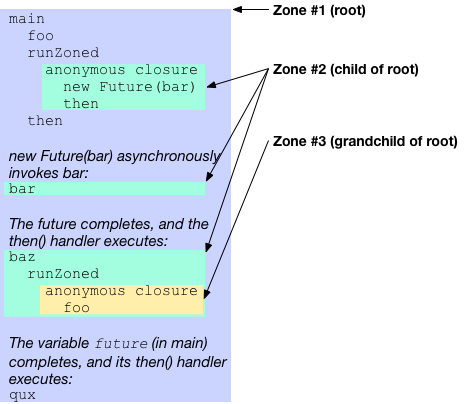
Each call to `runZoned()` creates a new zone
and executes code in that zone.
When that code schedules a task—such
as calling baz()—that
task executes in the zone where it was scheduled.
For example, the call to qux() (last line of main())
runs in
zone #1 (the root zone)
even though it's attached to a future that itself runs in
zone #2.
Child zones don't completely replace their parent zone.
Instead new zones are nested inside their surrounding zone.
For example,
zone #2 contains
zone #3, and
zone #1 (the root zone)
contains both
zone #2 and
zone #3.
All Dart code executes in the root zone.
Code might execute in other nested child zones as well,
but at a minimum it always runs in the root zone.
## Handling uncaught errors
Zones are able to catch and handle uncaught errors.
_Uncaught errors_ often occur because of code using `throw`
to raise an exception without an accompanying `catch`
statement to handle it.
Uncaught errors can also arise in `async` functions
when a Future completes with an error result,
but is missing a corresponding `await` to handle the error.
An uncaught error reports to the current zone that failed to catch it.
By default, zones will crash the program in response to uncaught errors.
You can install your own custom _uncaught error handler_ to a new zone
to intercept and handle uncaught errors however you prefer.
To introduce a new zone with an uncaught error handler,
use the `runZoneGuarded` method. Its `onError` callback becomes the
uncaught error handler of a new zone. This callback handles any
synchronous errors that the call throws.
```dart
runZonedGuarded(() {
Timer.run(() { throw 'Would normally kill the program'; });
}, (error, stackTrace) {
print('Uncaught error: $error');
});
```
_Other zone APIs that facilitate uncaught error handling include
[`Zone.fork`][], [`Zone.runGuarded`][]
and [`ZoneSpecification.uncaughtErrorHandler`][]._
[`Zone.fork`]: https://api.dart.dev/dart-async/Zone/fork.html
[`Zone.runGuarded`]: https://api.dart.dev/dart-async/Zone/runGuarded.html
[`ZoneSpecification.uncaughtErrorHandler`]: https://api.dart.dev/dart-async/ZoneSpecification/handleUncaughtError.html
The preceding code has an asynchronous callback
(through `Timer.run()`) that throws an exception.
Normally this exception would be an unhandled error and reach the top level
(which, in the standalone Dart executable, would kill the running process).
However, with the zoned error handler,
the error is passed to the error handler and doesn't shut down the program.
One notable difference between try-catch and zoned error handlers is
that zones continue to execute after uncaught errors occur.
If other asynchronous callbacks are scheduled within the zone,
they still execute.
As a consequence a zoned error handler might
be invoked multiple times.
Any zone with an uncaught error handler is called an _error zone_.
An error zone might handle errors that originate
in a descendant of that zone.
A simple rule determines where
errors are handled in a sequence of future transformations
(using `then()` or `catchError()`):
Errors on Future chains never cross the boundaries of error zones.
If an error reaches an error zone boundary,
it is treated as unhandled error at that point.
:::note API note
Handling uncaught errors doesn't *require* zones.
The isolate API [`Isolate.run()`][] also handles
listening for uncaught errors.
:::
[`Isolate.run()`]: https://api.dart.dev/dev/dart-isolate/Isolate/run.html
### Example: Errors can't cross into error zones
In the following example,
the error raised by the first line
can't cross into an error zone.
```dart
var f = new Future.error(499);
f = f.whenComplete(() { print('Outside of zones'); });
runZoned(() {
f = f.whenComplete(() { print('Inside non-error zone'); });
});
runZonedGuarded(() {
f = f.whenComplete(() { print('Inside error zone (not called)'); });
}, (error) { print(error); });
```
Here's the output you see if you run the example:
```plaintext
Outside of zones
Inside non-error zone
Uncaught Error: 499
Unhandled exception:
499
...stack trace...
```
If you remove the call to `runZoned()` or
to `runZonedGuarded()`,
you see this output:
```plaintext
Outside of zones
Inside non-error zone
[!Inside error zone (not called)!]
Uncaught Error: 499
Unhandled exception:
499
...stack trace...
```
Note how removing either the zone or error zone causes
the error to propagate further.
The stack trace appears because the error happens outside an error zone.
If you add an error zone around the whole code snippet,
then you can avoid the stack trace.
### Example: Errors can't leave error zones
As the preceding code shows,
errors can't cross into error zones.
Similarly, errors can't cross _out_ of error zones.
Consider this example:
```dart
var completer = new Completer();
var future = completer.future.then((x) => x + 1);
var zoneFuture;
runZonedGuarded(() {
zoneFuture = future.then((y) => throw 'Inside zone');
}, (error) { print('Caught: $error'); });
zoneFuture.catchError((e) { print('Never reached'); });
completer.complete(499);
```
Even though the future chain ends in a `catchError()`,
the asynchronous error can't leave the error zone.
The zoned error handler found in `runZonedGuarded()`
handles the error.
As a result, *zoneFuture never completes* — neither
with a value, nor with an error.
## Using zones with streams
The rule for zones and streams
is simpler than for futures:
:::note
Transformations and other callbacks execute in the zone
where the stream is listened to.
:::
This rule follows from the guideline that
streams should have no side effect until listened to.
A similar situation in synchronous code is the behavior of Iterables,
which aren't evaluated until you ask for values.
### Example: Using a stream with `runZonedGuarded()`
The following example sets up a stream with a callback,
and then executes that stream in a new zone with `runZonedGuarded()`:
```dart
var stream = new File('stream.dart').openRead()
.map((x) => throw 'Callback throws');
runZonedGuarded(() { stream.listen(print); },
(e) { print('Caught error: $e'); });
```
The error handler in `runZonedGuarded()`
catches the error the callback throws.
Here's the output:
```plaintext
Caught error: Callback throws
```
As the output shows,
the callback is associated with the listening zone,
not with the zone where `map()` is called.
## Storing zone-local values
If you ever wanted to use a static variable
but couldn't because
multiple concurrently running computations interfered with each other,
consider using a zone-local value.
You might add a zone-local value to help with debugging.
Another use case is dealing with an HTTP request:
you could have the user ID
and its authorization token in zone-local values.
Use the `zoneValues` argument to `runZoned()` to
store values in the newly created zone:
```dart
runZoned(() {
print(Zone.current[#key]);
}, zoneValues: { #key: 499 });
```
To read zone-local values, use the zone's index operator and the value's key:
[key].
Any object can be used as a key, as long as it has compatible
`operator ==` and `hashCode` implementations.
Typically, a key is a symbol literal:
#identifier.
You can't change the object that a key maps to,
but you can manipulate the object.
For example, the following code
adds an item to a zone-local list:
```dart
runZoned(() {
Zone.current[#key].add(499);
print(Zone.current[#key]); // [499]
}, zoneValues: { #key: [] });
```
A zone inherits zone-local values from its parent zone,
so adding nested zones doesn't accidentally drop existing values.
Nested zones can, however, shadow parent values.
:::important
Try to use unique objects for keys,
so they're less likely to conflict with other libraries.
:::
### Example: Using a zone-local value for debug logs
Say you have two files, foo.txt and bar.txt,
and want to print all of their lines.
The program might look like this:
```dart
import 'dart:async';
import 'dart:convert';
import 'dart:io';
Future splitLinesStream(stream) {
return stream
.transform(ASCII.decoder)
.transform(const LineSplitter())
.toList();
}
Future splitLines(filename) {
return splitLinesStream(new File(filename).openRead());
}
main() {
Future.forEach(['foo.txt', 'bar.txt'],
(file) => splitLines(file)
.then((lines) { lines.forEach(print); }));
}
```
This program works,
but let's assume that you now want to know
which file each line comes from,
and that you can't just add a filename argument to `splitLinesStream()`.
With zone-local values you can add the filename to the returned string
(new lines are highlighted):
```dart
import 'dart:async';
import 'dart:convert';
import 'dart:io';
Future splitLinesStream(stream) {
return stream
.transform(ASCII.decoder)
.transform(const LineSplitter())
[! .map((line) => '${Zone.current[#filename]}: $line')!]
.toList();
}
Future splitLines(filename) {
[! return runZoned(() {!]
return splitLinesStream(new File(filename).openRead());
[! }, zoneValues: { #filename: filename });!]
}
main() {
Future.forEach(['foo.txt', 'bar.txt'],
(file) => splitLines(file)
.then((lines) { lines.forEach(print); }));
}
```
Note that the new code doesn't modify the function signatures or
pass the filename from `splitLines()` to `splitLinesStream()`.
Instead, it uses zone-local values to implement
a feature similar to a static variable
that works in asynchronous contexts.
## Overriding functionality
Use the `zoneSpecification` argument to `runZoned()`
to override functionality that is managed by zones.
The argument's value is a
[ZoneSpecification](https://api.dart.dev/dart-async/ZoneSpecification-class.html) object,
with which you can override any of the following functionality:
* Forking child zones
* Registering and running callbacks in the zone
* Scheduling microtasks and timers
* Handling uncaught asynchronous errors
(`runZonedGuarded()` is a shortcut for this)
* Printing
### Example: Overriding print
As a simple example of overriding functionality,
here is a way to silence all prints inside a zone:
```dart
import 'dart:async';
main() {
runZoned(() {
print('Will be ignored');
}, zoneSpecification: new ZoneSpecification(
print: (self, parent, zone, message) {
// Ignore message.
}));
}
```
Inside the forked zone,
the `print()` function is overridden by the specified print interceptor,
which simply discards the message.
Overriding print is possible because `print()`
(like `scheduleMicrotask()` and the Timer constructors)
uses the current zone (`Zone.current`) to do its work.
### Arguments to interceptors and delegates
As the print example shows,
an interceptor adds three arguments
to those defined in the Zone class's corresponding method.
For example, Zone's `print()` method has one argument:
`print(String line)`.
The interceptor version of `print()`,
as defined by ZoneSpecification,
has four arguments:
`print(Zone self, ZoneDelegate parent, Zone zone, String line)`.
The three interceptor arguments always appear in the same order,
before any other arguments.
`self`
: The zone that's handling the callback.
`parent`
: A ZoneDelegate representing the parent zone.
Use it to forward operations to the parent.
`zone`
: The zone where the operation originated.
Some operations need to know which zone the operation was invoked on.
For example, `zone.fork(specification)` must
create a new zone as child of `zone`.
As another example,
even when you delegate `scheduleMicrotask()` to another zone,
the original `zone` must be the one that executes the microtask.
When an interceptor delegates a method to the parent,
the parent (ZoneDelegate) version of the method
has just one additional argument:
`zone`, the zone where the original call originated from.
For example,
the signature of the `print()` method on a ZoneDelegate is
`print(Zone zone, String line)`.
Here's an example of the arguments
for another interceptable method, `scheduleMicrotask()`:
| **Where defined** | **Method signature** |
| Zone | `void scheduleMicrotask(void f())` |
| ZoneSpecification | `void scheduleMicrotask(Zone self, ZoneDelegate parent, Zone zone, void f())` |
| ZoneDelegate | `void scheduleMicrotask(Zone zone, void f())` |
### Example: Delegating to the parent zone
Here is an example that shows how to delegate to the parent zone:
```dart
import 'dart:async';
main() {
runZoned(() {
var currentZone = Zone.current;
scheduleMicrotask(() {
print(identical(currentZone, Zone.current)); // prints true.
});
}, zoneSpecification: new ZoneSpecification(
scheduleMicrotask: (self, parent, zone, task) {
print('scheduleMicrotask has been called inside the zone');
// The origin `zone` needs to be passed to the parent so that
// the task can be executed in it.
parent.scheduleMicrotask(zone, task);
}));
}
```
### Example: Executing code when entering and leaving a zone
Say you want to know how much time some asynchronous code
spends executing.
You can do this by putting the code in a zone,
starting a timer every time the zone is entered,
and stopping the timer whenever the zone is left.
Providing `run*` parameters to the ZoneSpecification
lets you specify the code that the zone executes.
:::note API note
In the future, zones might provide a simpler alternative
for the common case of sandwiching zone code:
an onEnter/onLeave API.
See [issue 17532](https://github.com/dart-lang/sdk/issues/17532)
for details.
:::
The `run*` parameters—`run`, `runUnary`, and `runBinary`—specify
code to execute every time the zone is asked to execute code.
These parameters work for zero-argument, one-argument,
and two-argument callbacks, respectively.
The `run` parameter also works for the initial, synchronous code
that executes just after calling `runZoned()`.
Here's an example of profiling code using `run*`:
```dart
final total = new Stopwatch();
final user = new Stopwatch();
final specification = new ZoneSpecification(
run: (self, parent, zone, f) {
user.start();
try { return parent.run(zone, f); } finally { user.stop(); }
},
runUnary: (self, parent, zone, f, arg) {
user.start();
try { return parent.runUnary(zone, f, arg); } finally { user.stop(); }
},
runBinary: (self, parent, zone, f, arg1, arg2) {
user.start();
try {
return parent.runBinary(zone, f, arg1, arg2);
} finally {
user.stop();
}
});
runZoned(() {
total.start();
// ... Code that runs synchronously...
// ... Then code that runs asynchronously ...
.then((...) {
print(total.elapsedMilliseconds);
print(user.elapsedMilliseconds);
});
}, zoneSpecification: specification);
```
In this code,
each `run*` override just starts the user timer,
executes the specified function,
and then stops the user timer.
### Example: Handling callbacks
Provide `register*Callback` parameters to the ZoneSpecification
to wrap or change callback code—the code
that's executed asynchronously in the zone.
Like the `run*` parameters,
the `register*Callback` parameters have three forms:
`registerCallback` (for callbacks with no arguments),
`registerUnaryCallback` (one argument), and
`registerBinaryCallback` (two arguments).
Here's an example that makes the zone
save a stack trace
before the code disappears into an asynchronous context.
```dart
import 'dart:async';
get currentStackTrace {
try {
throw 0;
} catch(_, st) {
return st;
}
}
var lastStackTrace = null;
bar() => throw "in bar";
foo() => new Future(bar);
main() {
final specification = new ZoneSpecification(
registerCallback: (self, parent, zone, f) {
var stackTrace = currentStackTrace;
return parent.registerCallback(zone, () {
lastStackTrace = stackTrace;
return f();
});
},
registerUnaryCallback: (self, parent, zone, f) {
var stackTrace = currentStackTrace;
return parent.registerUnaryCallback(zone, (arg) {
lastStackTrace = stackTrace;
return f(arg);
});
},
registerBinaryCallback: (self, parent, zone, f) {
var stackTrace = currentStackTrace;
return parent.registerBinaryCallback(zone, (arg1, arg2) {
lastStackTrace = stackTrace;
return f(arg1, arg2);
});
},
handleUncaughtError: (self, parent, zone, error, stackTrace) {
if (lastStackTrace != null) print("last stack: $lastStackTrace");
return parent.handleUncaughtError(zone, error, stackTrace);
});
runZoned(() {
foo();
}, zoneSpecification: specification);
}
```
Go ahead and run the example.
You'll see a "last stack" trace (`lastStackTrace`)
that includes `foo()`,
since `foo()` was called synchronously.
The next stack trace (`stackTrace`)
is from the asynchronous context,
which knows about `bar()` but not `foo()`.
### Implementing asynchronous callbacks
Even if you're implementing an asynchronous API,
you might not have to deal with zones at all.
For example, although you might expect the dart:io library
to keep track of the current zones,
it instead relies on the zone handling of dart:async classes
such as Future and Stream.
If you do handle zones explicitly,
then you need to register all asynchronous callbacks
and ensure that each callback is invoked in the zone
where it was registered.
The `bind*Callback` helper methods of Zone
make this task easier.
They're shortcuts for `register*Callback` and `run*`,
ensuring that each callback is registered and runs in that Zone.
If you need more control than `bind*Callback` gives you,
then you need to use `register*Callback` and `run*`.
You might also want to use the `run*Guarded` methods of Zone,
which wrap the call into a try-catch
and invoke the `uncaughtErrorHandler`
if an error occurs.
## Summary
Zones are good for protecting your code from
uncaught exceptions in asynchronous code,
but they can do much more.
You can associate data with zones,
and you can override core functionality such as
printing and task scheduling.
Zones enable better debugging and provide hooks
that you can use for functionality such as profiling.
### More resources
Zone-related API documentation
: Read the docs for
[runZoned()](https://api.dart.dev/dart-async/runZoned.html),
[runZonedGuarded()](https://api.dart.dev/dart-async/runZonedGuarded.html),
[Zone](https://api.dart.dev/dart-async/Zone-class.html),
[ZoneDelegate](https://api.dart.dev/dart-async/ZoneDelegate-class.html), and
[ZoneSpecification](https://api.dart.dev/dart-async/ZoneSpecification-class.html).
stack_trace
: With the stack_trace library's
[Chain class](https://pub.dev/documentation/stack_trace/latest/stack_trace/Chain-class.html)
you can get better stack traces for asynchronously executed code.
See the [stack_trace package](https://pub.dev/packages/stack_trace)
at the pub.dev site for more information.
### More examples
Here are some more complex examples of using zones.
The task_interceptor example
: The toy zone in
[task_interceptor.dart](https://github.com/dart-archive/www.dartlang.org/blob/master/src/tests/site/articles/zones/task_interceptor.dart)
intercepts `scheduleMicrotask`, `createTimer`, and `createPeriodicTimer`
to simulate the behavior of the Dart primitives
without yielding to the event loop.
The source code for the stack_trace package
: The [stack_trace package](https://pub.dev/packages/stack_trace)
uses zones to form chains of stack traces
for debugging asynchronous code.
Zone features used include error handling, zone-local values, and callbacks.
You can find the stack_trace source code in the
[stack_trace GitHub project](https://github.com/dart-lang/stack_trace).
The source code for dart:async
: These two SDK libraries implement APIs featuring asynchronous callbacks,
and thus they deal with zones.
You can browse or download their source code under the
[sdk/lib directory](https://github.com/dart-lang/sdk/tree/main/sdk/lib)
of the
[Dart GitHub project](https://github.com/dart-lang/sdk).
_Thanks to Anders Johnsen and Lasse Reichstein Nielsen
for their reviews of this article._